
Introduction
Learning how to write a blog is not simply a matter of opening a blank document and starting to type. A useful blog begins with a clear purpose, a defined audience, a worthwhile topic, and a plan for turning information into something readers can actually use.
Whether you want to start a personal blog, publish articles for a business, work as a freelance writer, support a content-marketing strategy, or build a website around a subject you understand, the underlying process is similar.
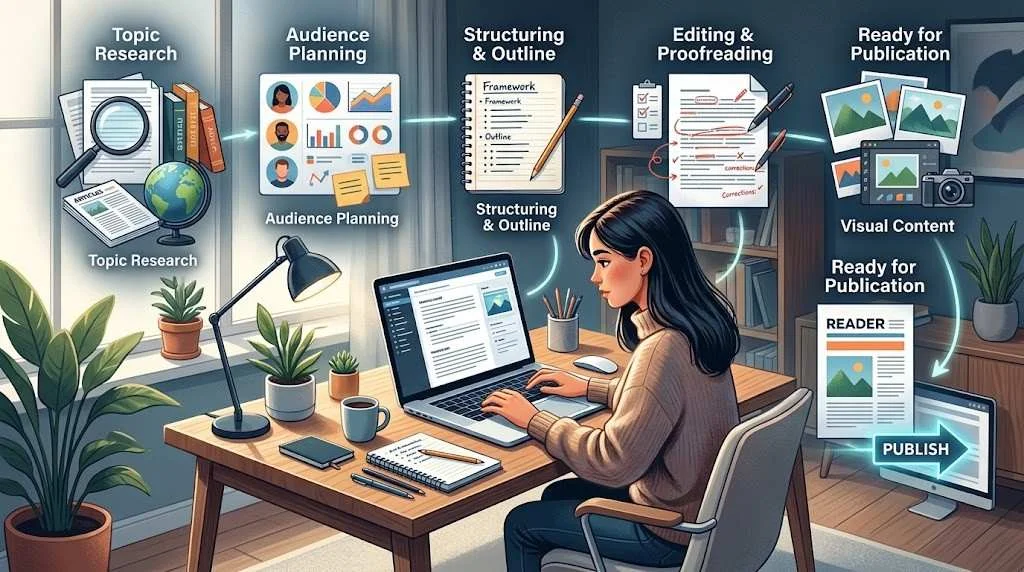
You need to decide what to write, understand who you are writing for, research the subject, choose an angle, create a useful structure, write and edit the content, and finally publish and improve it over time.
This guide explains how to write a blog from the first idea through publication and ongoing improvement. It also includes hypothetical examples so you can see how a basic idea can become a focused and useful article.
The goal is not to create content simply because a website needs more pages. The goal is to create something worth reading.
What Is a Blog?
A blog is a collection of regularly published articles or posts on a website. A blog can cover almost any subject, including business, technology, travel, education, hobbies, personal interests, professional expertise, or specific problems faced by a particular audience.
A blog post may:
- Answer a question
- Explain a process
- Teach a skill
- Compare different options
- Share practical guidance
- Explain a complex subject
- Help readers make a decision
- Provide commentary or analysis
Blogging can therefore serve different purposes.
A personal blogger might use articles to share knowledge about gardening. A business might publish educational content related to its products or industry. A freelance writer might use a blog to demonstrate writing ability. A website owner might create informational articles that support the site’s broader purpose.
The format is flexible, but useful blogging usually begins with the same question:
What does the reader need from this article?
How to Start Planning a Blog
Before worrying about keywords, word count, or publishing frequency, establish the basic direction of your blog.
Planning does not have to be complicated. Start with four things:
- Your audience
- Your subject area
- The problems or questions you can address
- The purpose of your content
Define Your Audience
Knowing your audience helps determine what you should explain and how deeply you should explain it.
For example, an article about website analytics written for a complete beginner should explain basic terminology. An article for experienced marketers can assume more background knowledge and focus on interpretation or strategy.
Create a simple reader profile:
“This article is for small business owners who understand basic website concepts but need practical guidance without technical jargon.”
That statement immediately gives the writer direction.
You can then ask:
- What does this reader already know?
- What are they trying to accomplish?
- What mistakes might they make?
- What terminology will they understand?
- What information would save them time or confusion?
The clearer the audience, the easier it becomes to make writing decisions.
Choose a Useful Topic
A good blog topic should be specific enough to address properly.
For example:
Broad topic:
Healthy Eating
More focused topic:
How to Plan Simple Weeknight Meals for a Busy Family
The second topic gives you a clearer audience and problem.
You can generate topic ideas from:
- Questions customers frequently ask
- Problems you understand well
- Discussions within your industry
- Existing products or services
- Common beginner mistakes
- Areas where readers need step-by-step guidance
- Questions related to your website’s main subject
If a topic has potential commercial value, approach that realistically. A useful article may support awareness, trust, or future business decisions, but you should not assume that publishing one article will automatically generate income.
Understand Search Intent
Search intent is the reason behind a person’s search.
Someone searching:
“how to write a blog”
is probably looking for practical information about creating blog content.
Someone searching:
“best blogging platform”
may be comparing options.
Someone searching:
“blog writing service”
has a different, more commercially oriented purpose.
Understanding the intent helps determine what type of article you should create.
Before writing, ask:
“If I were searching for this phrase, what information would I expect to find?”
That simple question can prevent you from creating an article that technically discusses the keyword but does not answer the underlying need.
How to Research Your Blog Topic
Research gives you the information needed to explain a topic responsibly.
Start by breaking the subject into smaller questions.
For example, if you are writing about how to create blog content, your research questions might include:
- What does the reader need to know first?
- What steps are involved?
- Which terms need explanation?
- What common mistakes should be addressed?
- Which claims require evidence?
- Are there official sources or documentation worth consulting?
- What examples could make the explanation clearer?
Use sources appropriate to the subject. For technical topics, official documentation may be more useful than a random summary. For industry topics, established publications and original research can provide stronger support.
Separate Research From Copying
Research should help you understand a subject, not give you paragraphs to reproduce.
A useful process is:
Research → Understand → Organize → Explain in your own words
Do not assume that changing a few words from another article makes the content original.
Instead, identify what readers need to understand and develop your own explanation, examples, structure, and practical guidance.
Create Research Notes
Before drafting, you might create notes such as:
| Research area | What to collect |
| Main topic | Core definition and purpose |
| Reader questions | Problems the article should answer |
| Supporting points | Important subtopics |
| Evidence | Reliable information and sources |
| Examples | Hypothetical situations or demonstrations |
| Gaps | Information other explanations may not clarify |
This keeps research organized and reduces the temptation to write while constantly switching between sources.
Choose a Strong Blog Angle
Two articles can cover the same topic while providing very different value.
The angle is the particular way you approach the subject.
For example, instead of:
How to Use Social Media
you might choose:
How a Small Local Business Can Plan One Week of Social Media Content
The second angle is more specific.
Possible angles include:
- Beginner’s guide
- Step-by-step tutorial
- Practical checklist
- Comparison
- Problem-solving guide
- Mistakes and solutions
- Process explanation
- Examples-based tutorial
Hypothetical Example: Narrowing an Angle
Initial idea:
Freelancing
Focused topic:
How New Freelancers Can Create a Simple Portfolio
Specific angle:
How to Create a Freelance Portfolio When You Have No Client Work to Display
The final angle gives the writer a particular problem to solve.
That makes the article easier to structure and more useful to the intended reader.
How to Write a Blog Title
A blog title should accurately describe the article and make the subject immediately understandable.
Compare:
Blogging Advice
with:
How to Write a Blog: A Complete Step-by-Step Guide
The second title communicates the subject and format more clearly.
A useful title should be:
- Clear
- Specific
- Relevant
- Natural
- Consistent with the article
Avoid making promises the article cannot fulfill.
For example, a title such as:
“The Guaranteed Way to Get Thousands of Blog Visitors”
creates an expectation that a responsible article cannot guarantee.
A stronger approach is to accurately describe what the reader will learn.
Create a Clear Blog Outline
An outline gives your article direction before you begin writing.
A basic blog outline might contain:
H1: Main title
Introduction
H2: First major question
H3: Supporting explanation
H2: Second major question
H3: Practical example
H2: Implementation
H3: Common mistake
H2: Final considerations
Conclusion
The exact structure should depend on the topic.
A simple how-to article may work well as a sequence of steps. A comparison may need a table. A detailed educational article may require several H2 sections with supporting H3 sections.
If you want to see a practical example of how planning can be organized, organize your ideas before drafting before moving into the first draft.
Example: Turning a Basic Outline Into a Useful Section
Basic outline:
H2: Choose a Topic
This is a starting point, but it does not tell the writer much.
A stronger planning version might be:
H2: Choose a Topic That Solves a Specific Reader Problem
- Identify recurring questions
- Narrow broad subjects
- Check whether the topic matches the audience
- Select a practical angle
- Demonstrate the process with an example
The second outline makes the eventual article much easier to write.
If you prefer a repeatable starting structure, you can also use a structured starting point for your article, then modify it according to the subject.
How to Write the Introduction
The introduction should quickly answer:
- What is this article about?
- Why might the reader care?
- What will the article help them do?
Avoid filling the opening with generic statements about how important blogging is.
Hypothetical Example: Weak Introduction
Blogging is very popular today. Many people have blogs for different reasons. Writing blogs can be difficult for beginners. There are many things you need to know about blogging.
The reader learns very little from this introduction.
Improved Introduction
Starting a blog can feel complicated when you are unsure what to write, who to write for, or how to organize an article. A practical blogging process removes much of that uncertainty: choose a focused topic, understand the reader, research the subject, create an outline, write the draft, and improve it before publishing.
The improved version establishes the problem and immediately introduces the process.
How to Write the Main Body
The main body is where you deliver the information promised by the introduction.
A useful section should have a purpose. It might answer a question, explain a step, demonstrate an idea, or help the reader make a decision.
Use Clear Headings
Headings help readers navigate longer articles.
Instead of:
More Information
use:
How to Choose Examples That Clarify Your Explanation
The second heading tells the reader exactly what they will find.
Use H2 headings for major topics and H3 headings for supporting points when needed.
Explain Ideas Clearly
Avoid assuming that a reader understands specialist terminology.
If a technical term is necessary, explain it when it first appears.
For example:
Search intent is the reason behind a person’s search. Someone searching for “how to clean a laptop keyboard” is probably looking for instructions, while someone searching for “laptop keyboard replacement” may be investigating a different solution.
The explanation becomes easier to understand because the definition is immediately connected to examples.
Add Examples
Examples can turn abstract advice into something practical.
Suppose you tell a writer:
“Make your content more specific.”
That is useful advice, but it becomes stronger with an example.
Basic sentence:
You should create useful content for your readers.
Improved version:
If your audience consists of first-time website owners, replace broad advice such as “improve your website” with a specific action such as “create a clear homepage headline that explains what the business offers and who it serves.”
The second version demonstrates what “useful” can mean in practice.
Use Evidence and References Where Appropriate
Not every sentence requires a citation.
However, factual claims, technical recommendations, statistics, research findings, and statements about official policies may require reliable supporting sources.
When evidence matters, use appropriate sources and represent them accurately.
Do not invent statistics to make an article appear authoritative.
Do not turn an ordinary hypothetical example into a fake case study.
For example:
“Imagine a fictional bakery creating a blog for customers interested in home baking.”
This is clearly hypothetical.
It is very different from claiming:
“A bakery used this strategy and increased its traffic by 300%.”
unless you have genuine evidence for that claim.
How to Write a Strong Conclusion
A conclusion should bring the article to a useful stopping point.
You can:
- Reinforce the main idea
- Summarize the most important steps
- Give the reader a practical next action
Avoid introducing several new ideas at the very end.
For a blogging guide, a suitable next step might be to choose one topic, define its audience, create an outline, and write a first draft.
The conclusion does not need to repeat every heading. It should remind the reader what matters most.
Basic SEO for Blog Writing
SEO is one part of creating useful blog content. It should not become the entire purpose of the article.
When creating SEO-friendly blog content, start with the reader’s needs and then make the page easy for search engines to understand.
Basic considerations include:
- Use a descriptive title.
- Create a clear URL.
- Use one logical H1.
- Organize major sections with H2 headings.
- Use H3 headings when they improve organization.
- Include relevant terminology naturally.
- Match the article to search intent.
- Write a useful meta title and description.
- Add descriptive image alt text.
- Link to relevant pages.
- Keep the page easy to read on mobile devices.
Use Keywords Naturally
If the target phrase is how to write a blog, it can naturally appear in the title, introduction, relevant sections, and conclusion.
Related language can also appear where appropriate:
- how to start a blog
- how to write a blog post
- blog writing
- blog writing process
- blog post structure
- blog writing tips
- how to create blog content
- writing a good blog
There is no benefit in forcing these phrases into every heading.
Natural language is usually clearer for readers.
Internal Linking
Internal links help readers discover related information and can provide useful context between pages.
For example, a reader interested in guest content may naturally need additional information about search optimization. In that context, learn about SEO considerations for guest content can be a relevant next resource.
The important principle is relevance. Do not add links merely because you want more links on the page.
How to Add Images Appropriately
Images can improve comprehension and make long articles easier to navigate.
Useful image types include:
- Process illustrations
- Diagrams
- Original screenshots
- Relevant photographs
- Infographics
- Before-and-after visual demonstrations
An image should have a purpose.
For example, an article explaining a content workflow could use an illustration showing:
Topic → Research → Outline → Draft → Edit → Publish
That visual reinforces the written explanation.
Write descriptive alt text for meaningful images. The alt text should describe the image rather than stuffing keywords into it.
Avoid adding decorative images simply to make an article appear longer.
How to Edit and Improve Your Blog
The first draft is not necessarily the final draft.
Editing should happen in several passes.
Check the Overall Structure
Ask:
- Does the article answer its main question?
- Is the information in a logical order?
- Are any sections unnecessary?
- Is anything important missing?
- Does the introduction match the title?
Improve Clarity
Replace vague statements with specific explanations.
For example:
Weak:
Make your content better.
Improved:
Replace general claims with specific explanations, examples, and actions that show readers how to apply the advice.
Remove Repetition
An article can become longer without becoming more useful.
If two sections make essentially the same point, combine them or give each section a distinct purpose.
Proofread
Check:
- Spelling
- Grammar
- Punctuation
- Headings
- Formatting
- Links
- Image descriptions
- Sentence clarity
- Repeated words
Reading the article aloud can reveal awkward phrasing that is easy to overlook on screen.
How to Publish a Blog Post
Once the article has been edited, publishing involves more than pressing the publish button.
Before publication, review:
- Title
- URL
- Content formatting
- Featured image
- Body images
- Alt text
- Meta title
- Meta description
- Internal links
- External references
- Categories or relevant taxonomy
- Mobile appearance
- Preview of the final page
Read the published page yourself.
Check that headings look correct, links work, images display properly, and paragraphs are comfortable to read on a phone.
Publishing should be treated as the beginning of the content’s life, not necessarily the end of the process.
How to Update Existing Blog Content
Older content can become less useful when information changes or when you discover opportunities to improve an explanation.
An update might involve:
- Correcting outdated information
- Replacing broken references
- Adding a missing section
- Improving examples
- Clarifying confusing paragraphs
- Updating screenshots
- Improving internal links
- Revising the introduction
- Removing information that is no longer relevant
Do not update an article simply to change its publication date.
The purpose of an update should be to make the content more useful or accurate.
A useful review question is:
“If someone reads this article today, is anything confusing, outdated, incomplete, or unnecessarily difficult to understand?”
Measuring Content Performance Responsibly
After publishing, you can monitor how your content performs, but interpret the data carefully.
Depending on your website and analytics setup, you may look at:
- Search impressions
- Search clicks
- Search queries
- Click-through rate
- Engagement signals
- Page views
- Conversions where relevant
- Internal navigation
- Reader feedback
These measurements provide clues rather than guaranteed explanations.
For example, a page receiving impressions but few clicks might warrant reviewing its title or search-result presentation. A page receiving visitors but little engagement might have an intent mismatch or a weak user experience.
Do not assume that every change in traffic is caused by one article.
Likewise, do not judge an article solely by one metric.
The goal is to learn what readers need and improve the content accordingly.
Common Blogging Mistakes
Choosing Topics That Are Too Broad
A broad subject can make an article unfocused.
Solution: Narrow the topic around a specific audience, question, or problem.
Writing Without an Audience
Content written for everyone often feels relevant to nobody.
Solution: Define the primary reader before drafting.
Copying the Structure of Other Articles
Researching competing content can help you understand a topic, but simply reproducing another article’s structure and wording does not create meaningful originality.
Solution: Build your own organization around what your audience needs.
Focusing Too Much on Keywords
Repeated keywords can make writing unnatural.
Solution: Use terminology naturally and prioritize clear explanations.
Writing Long Introductions
Readers generally want to reach the answer quickly.
Solution: Explain the problem and purpose early.
Using Generic Examples
An example should demonstrate something specific.
Solution: Show a realistic situation, decision, process, or before-and-after improvement.
Publishing Without Editing
Even good ideas can become difficult to read when the draft contains repetition, errors, or awkward transitions.
Solution: Perform separate structure, clarity, and proofreading passes.
Expecting Immediate Results
Content performance can vary significantly. Publishing an article does not guarantee rankings, traffic, leads, backlinks, or income.
Solution: Treat publishing as part of a longer process of learning, measuring, and improving.
Using Manipulative SEO Techniques
Do not create content primarily to manipulate search results.
Review Google’s recommendations for avoiding search manipulation when evaluating SEO practices.
Complete Hypothetical Blog-Writing Example
The following is a fictional example showing how the complete process can work.
Topic
How to Organize a Small Home Office
Audience
Beginners working from home who want a more practical and organized workspace.
Search Intent
Primarily informational and practical. The reader wants ideas and steps for organizing the workspace.
Blog Angle
A simple organization process based on frequency of use rather than expensive equipment or major renovations.
Title
How to Organize a Small Home Office: A Simple Practical Guide
Outline
Introduction
Explain why small workspaces become difficult to manage and introduce the organization process.
H2: Remove Items That Do Not Belong
Separate necessary items from clutter.
H2: Group Items by Frequency of Use
Keep everyday items accessible and occasional items stored elsewhere.
H2: Create Simple Work Zones
Give frequently performed tasks dedicated areas.
H2: Review the Workspace
Use the office for several days and adjust the setup.
Conclusion
Summarize the process and encourage the reader to start with one small area.
Introduction
A small home office does not need expensive furniture to become easier to use. Start by removing items that do not belong in the workspace, then organize the remaining items according to how often you use them. This guide walks through a simple process for creating a cleaner and more practical setup.
Main Section Example
H2: Group Items by Frequency of Use
Keep the items you use every day within easy reach. Items used occasionally can be stored in drawers, shelves, or another appropriate location.
For example, a notebook, pen, and headphones used throughout the day might remain near the main working area, while spare cables and rarely used accessories can be stored together.
This approach reduces unnecessary movement and keeps the primary workspace focused.
Conclusion
Organizing a small home office does not require a complicated system. Remove unnecessary items, group the things you actually use, create simple work zones, and adjust the arrangement after using it. A practical workspace should make everyday tasks easier rather than simply look organized.
This hypothetical example demonstrates the complete blog writing process:
Topic → Audience → Search intent → Angle → Title → Outline → Introduction → Main sections → Conclusion

Practical Blog-Writing Workflow
Once you understand the individual steps, combine them into a repeatable workflow.
Before Writing
- Choose the topic.
- Define the audience.
- Identify the search intent.
- Research the subject.
- Decide the angle.
- Create the title.
- Build the outline.
During Writing
- Write the introduction.
- Develop each H2 section.
- Add useful H3 subsections where needed.
- Explain concepts clearly.
- Add relevant examples.
- Include evidence or references where appropriate.
- Write the conclusion.
Before Publishing
- Edit the structure.
- Improve readability.
- Remove repetition.
- Proofread the article.
- Add appropriate images.
- Check SEO basics.
- Check internal links.
- Preview the page on mobile.
- Publish.
After Publishing
- Monitor relevant performance data.
- Review reader feedback where available.
- Update information when necessary.
- Improve weak sections over time.
This workflow is flexible. Some topics will require more research, while others may need more examples or visual explanations.
The objective is consistency without turning every article into an identical template.
Blog Writing Checklist
Use this checklist before publishing:
Planning
- [ ] Is the topic focused?
- [ ] Is there a clear audience?
- [ ] Do I understand the reader’s intent?
- [ ] Does the article have a useful angle?
- [ ] Have I researched the subject appropriately?
Writing
- [ ] Does the title accurately describe the article?
- [ ] Does the introduction explain the purpose?
- [ ] Are the H2/H3 headings useful?
- [ ] Does every major section have a clear purpose?
- [ ] Are explanations specific?
- [ ] Are examples relevant?
- [ ] Are factual claims supported where appropriate?
- [ ] Does the conclusion provide a useful next step?
SEO and Formatting
- [ ] Is the primary topic used naturally?
- [ ] Is the URL readable?
- [ ] Is there one clear H1?
- [ ] Are headings properly organized?
- [ ] Are internal links relevant?
- [ ] Are external references appropriate?
- [ ] Is image alt text descriptive?
- [ ] Is the page easy to read on mobile?
Final Review
- [ ] Have I removed unnecessary repetition?
- [ ] Have I checked grammar and spelling?
- [ ] Have I checked links?
- [ ] Have I reviewed the page layout?
- [ ] Does the article genuinely help the intended reader?
- [ ] Have I avoided unsupported claims and promises?
FAQs
How do I start a blog?
Start by deciding what subject you can consistently discuss and who you want to help. Then choose a focused topic, research it, create an outline, write the article, edit it, and publish it on an appropriate blogging platform or website.
How do I write a blog post?
Choose a focused topic, identify the target reader, understand the search intent, research the subject, create a title and outline, write the introduction and main sections, add useful examples, edit the draft, and publish it.
What should I write about on my blog?
Write about questions, problems, interests, or subjects that are genuinely relevant to your intended audience. Look for topics where you can provide useful explanations, practical guidance, examples, or informed analysis.
How long should a blog post be?
There is no universal word count that makes a blog post successful. The appropriate length depends on the subject and the amount of information required to satisfy the reader. Focus on completeness and usefulness rather than writing to reach an arbitrary number.
How often should I publish blog posts?
There is no single publishing frequency that works for every website. A manageable schedule is generally more useful than publishing large amounts of content that cannot be properly researched, written, or maintained.
Does every blog post need SEO?
If you want your content to be discoverable through search engines, basic SEO can be helpful. However, SEO should support the content rather than replace good writing. The article should first satisfy the reader’s needs.
Should I use a blog template?
A template can make the writing process more consistent and help you remember important elements. However, adapt the structure to each topic instead of forcing every article into identical sections.
Can a blog make money?
A blog can be part of a business model, but income is not automatic or guaranteed. Potential monetization methods can include advertising, products, services, sponsorships, memberships, or other business models depending on the website and audience.
How do I improve an old blog post?
Review the article for outdated information, missing explanations, weak examples, broken references, readability issues, and opportunities for better organization. Update the content when there is a genuine reason to improve it rather than changing it simply to make it appear fresh.
What makes a blog post useful?
A useful blog post answers a specific reader need clearly and provides enough context, explanation, examples, or evidence to help the reader understand or act on the information.
Conclusion
Learning how to write a blog becomes much easier when you treat writing as a process rather than a single task.
Start with a useful topic and define the person you want to help. Understand what that reader is looking for, research the subject carefully, choose a clear angle, and create an outline before drafting.
Then write an introduction that establishes the problem, build useful H2 and H3 sections, explain ideas clearly, and use relevant examples to make abstract concepts easier to understand. Add images when they genuinely improve comprehension, apply basic SEO naturally, and connect readers to relevant internal resources.
Before publishing, edit for structure, clarity, accuracy, readability, grammar, and repetition. After publication, use performance data and reader feedback as signals for future improvements rather than treating any single metric as a complete measure of success.
The best blog writing is not necessarily the longest or most heavily optimized. It is content that understands its reader, answers the right question, communicates clearly, and provides genuine value.
If you consistently follow that process, you have a practical foundation for creating better blog content across personal projects, business websites, freelance work, and content-marketing campaigns.