
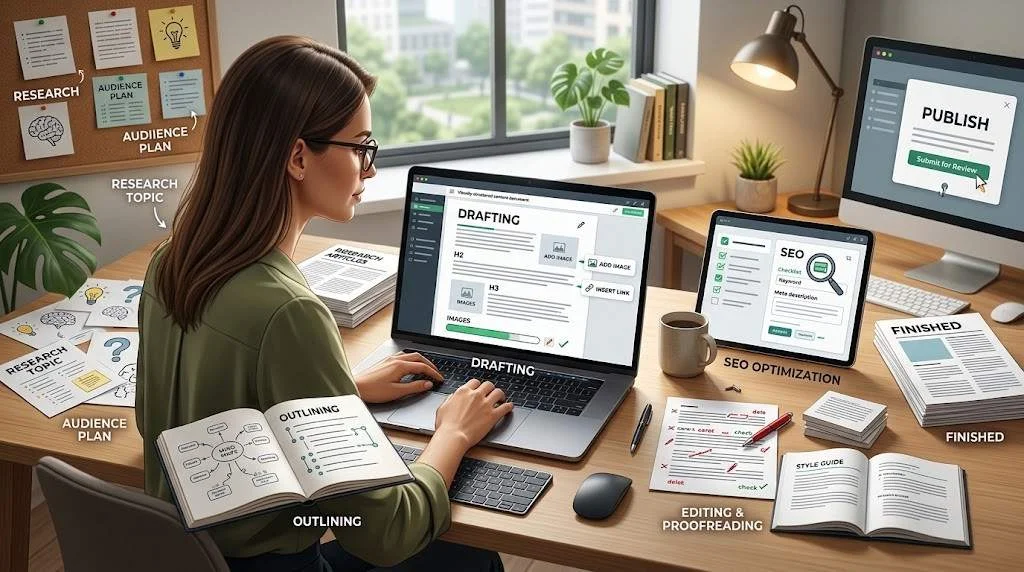
Writing a blog post is more than putting words on a page. A useful article starts with a reader, a clear purpose, and a topic worth exploring. From the first research note to the final edit, every decision should make the finished piece easier to understand and more useful.
If you are learning how to write a blog post, you may already know that the process involves choosing a topic, writing an introduction, adding headings, and finishing with a conclusion. The harder part is knowing what to say, what to leave out, how to organize the information, and how to make the article genuinely worth reading.
This guide walks through the complete blog writing process, from choosing an idea and researching it to writing, editing, publishing, and updating the finished article.
It is designed for beginners, bloggers, freelance writers, content marketers, business owners, and SEO professionals who want a practical process for creating better blog content.
What Is a Blog Post?
A blog post is a published piece of online content created to inform, explain, teach, entertain, answer a question, or help readers solve a problem.
Blog posts can take many forms, including:
- How-to guides
- Tutorials
- Educational articles
- Industry explainers
- Comparisons
- Checklists
- Opinion pieces
- Beginner guides
- Product or service education
- Research-based articles
- Practical resources
The format depends on the purpose.
A beginner guide may need definitions and step-by-step instructions. A comparison article may need a clear set of evaluation criteria. A practical tutorial may need examples and troubleshooting advice.
That is why there is no single perfect blog post format for every topic.
If you are completely new to blogging, it can help to first learn the fundamentals of blogging before building a more detailed content strategy.
The key principle is simple:
A good blog post should give the intended reader something useful that they can understand, apply, or act on.
Before You Write: Plan Your Article
One of the biggest mistakes in blog article writing is starting the draft before deciding what the article needs to accomplish.
You do not need a complicated planning system. A few clear decisions can prevent hours of rewriting later.
Define Your Target Reader
Start by deciding who you are writing for.
“Everyone” is usually too broad.
Instead, describe the person who is most likely to benefit from the article.
For example:
A beginner freelance writer who understands basic blogging but struggles to organize and complete useful articles.
That description immediately gives you direction.
You can then ask:
- What does this reader already know?
- What are they likely to find confusing?
- What problem are they trying to solve?
- What level of detail do they need?
- What action should they be able to take afterward?
A beginner and an experienced SEO professional may search for the same topic but expect very different explanations.
Choose a Focused Topic
Good blog post ideas often begin with broad subjects, but broad subjects are not always good article topics.
Consider:
Broad:
Digital marketing
More focused:
How to Create a Digital Marketing Plan for a Small Business
The second topic gives the writer a specific audience, problem, and outcome.
A useful test is:
Can I explain exactly what this article will help the reader understand or accomplish?
If you cannot answer that question clearly, narrow the topic.
Understand Search Intent
If people are discovering your article through search, consider what they are actually trying to accomplish.
For example:
- “what is content marketing” suggests a desire to understand a concept.
- “how to create a content calendar” suggests a practical task.
- “best project management tools” suggests evaluation.
- “Email marketing vs social media marketing” suggests a comparison.
Search intent should influence the article’s structure.
Do not force a how-to article into a list of definitions if the reader is looking for instructions.
Decide the Main Angle
A topic can support several different articles.
Suppose the broad topic is guest posting.
Possible angles include:
- Guest posting for beginners
- How to prepare a guest post
- How businesses can evaluate publishing opportunities
- Common guest posting mistakes
- How to write an effective guest post pitch
Each angle creates a different article.
Choose one primary angle and let it guide your research and structure.
Research Your Topic
Research gives your article substance.
The goal is not to collect the largest possible pile of information. The goal is to understand the topic well enough to explain it accurately and usefully.
Find Reliable Information
Start with sources appropriate to the subject.
Depending on your topic, useful sources may include:
- Official documentation
- Government resources
- Academic or research publications
- Established industry organizations
- Primary sources
- Expert publications
- Original data
- Reputable news sources
Be especially careful with claims that could change over time.
If you are writing about software, policies, search guidelines, prices, laws, or current practices, verify information close to publication.
Identify Important Questions
Research should also reveal the questions readers are likely to have.
For a guide about starting a newsletter, readers might wonder:
- What should the newsletter be about?
- How often should it be sent?
- What should the first email contain?
- How do you collect subscribers?
- What should you measure?
- What mistakes should beginners avoid?
These questions can become sections or subsections in the article.
Organize Your Research
Do not paste every useful source into one giant document.
Group your notes by purpose:
| Research category | What to collect |
| Definitions | Terms readers need to understand |
| Main process | Steps or actions |
| Supporting details | Explanations that add context |
| Examples | Situations that make ideas clearer |
| Common problems | Mistakes, limitations, or obstacles |
| Verification | Claims that need fact-checking |
This makes it much easier to turn research into an article rather than simply summarizing sources.
Choose a Strong Blog Post Title
Your title is the first indication of what the article offers.
A useful title should be clear, specific, and accurate.
Weak title
Tips for Better Content
The reader does not know exactly what they will learn.
Improved title
How to Create a Content Calendar for a Small Business
Now the topic, audience, and intended outcome are clearer.
Another example
Weak:
Blog Writing Guide
Improved:
How to Write a Blog Post: A Complete Step-by-Step Guide
The stronger version tells the reader what the article is about and what type of information it provides.
Avoid titles that promise something the article does not deliver. A compelling title should create interest through clarity rather than exaggeration.
Create an Effective Outline
An outline turns your research into a workable structure.
Start with the major questions the article needs to answer. Then organize those questions in an order that makes sense to the reader.
A basic structure might look like:
- Introduction
- What the topic means
- Why it matters
- How to approach it
- Step-by-step process
- Examples
- Common mistakes
- FAQs
- Conclusion
The exact structure should change according to the topic.
For complex articles, map out your article before writing so you can identify missing information and overlapping sections before drafting.
An outline should answer three questions for every major section:
- Why is this section here?
- What does the reader need to learn?
- What example or supporting detail would make it clearer?
You can also work from a reusable article framework when you need a repeatable starting point for different topics.
How to Write the Introduction
The introduction has one main job: help the reader understand that they are in the right place.
You do not need to spend several paragraphs warming up.
A useful introduction often contains four elements:
- The reader’s problem, question, or goal
- A brief explanation of why the topic matters
- What the article will cover
- A smooth transition into the main content
Weak introduction example
Blogging is very popular today. Many people write blogs for different reasons. Writing a blog post can be difficult, but there are many things you can do to improve.
This is vague and could introduce almost any blogging article.
Improved hypothetical example
Writing a useful blog post starts before the first sentence. You need to know who you are writing for, what question you are answering, and which information will actually help the reader. This guide breaks the process into practical steps, from choosing a focused topic and researching it to drafting, editing, publishing, and updating the finished article.
The second version gives the reader a clear reason to continue.
How to Write the Main Body
The body is where the article delivers most of its value.
Every section should contribute something useful rather than simply increasing the word count.
Use Clear Headings
Headings divide a long article into understandable sections.
A reader should be able to scan your H2 and H3 headings and understand the overall subject.
For example:
How to Choose a Blog Topic
Start With a Reader Problem
Check Whether the Topic Is Specific Enough
Decide What the Article Will Help the Reader Do
The hierarchy is clear, and each subsection supports the main idea.
Explain Ideas Clearly
Do not assume that complicated wording makes content more authoritative.
If a simple explanation works, use it.
When introducing an unfamiliar concept:
- Name it.
- Explain what it means.
- Explain why it matters.
- Give an example if useful.
- Connect it to the reader’s situation.
This approach works across many subjects.
Add Examples
Examples turn abstract advice into something readers can visualize.
For example, instead of saying:
Choose a specific topic.
Show the transformation:
Broad topic:
Fitness
Focused topic:
How Beginners Can Build a Simple Three-Day Workout Routine
The example demonstrates the principle without requiring a long explanation.
You can see blog writing in practice if you want additional examples of how ideas can be developed into complete posts.
Use Supporting Details
Not every statement needs a long explanation.
Add details when they help the reader:
- Understand a difficult idea
- Complete a task
- Avoid a common mistake
- Compare options
- Make a decision
- Apply the advice to a real situation
Avoid adding information simply because you found it during research.
Keep Paragraphs Easy to Read
Online readers often scan before deciding which sections deserve closer attention.
Make your article easier to navigate with:
- Short paragraphs
- Descriptive headings
- Bulleted lists
- Numbered steps
- Tables where comparisons are useful
- Bold emphasis used sparingly
- Examples
- Clear transitions
Short does not mean shallow. A detailed explanation can still be easy to read when it is divided into logical pieces.

How to Write a Strong Conclusion
A conclusion should bring the article together.
It should not introduce a completely new subject.
A useful conclusion can:
- Reinforce the main lesson
- Summarize the most important actions
- Encourage the reader to apply what they learned
- Point toward a logical next step
Weak hypothetical conclusion
In conclusion, blogging is important and there are many things to remember. We hope these tips help you write better blog posts.
It says very little.
Improved hypothetical conclusion
A useful blog post starts with a clear reader need and develops that need into a focused topic, well-researched structure, useful explanations, and practical examples. Before publishing, check the article for accuracy, clarity, repetition, formatting, and search intent. Once those pieces are in place, the goal is no longer simply to publish more words—it is to give the reader a better answer.
The second version reinforces the article’s central idea.
How to Add a Natural Call to Action
A call to action, or CTA, tells the reader what they can do next.
The CTA should logically follow the article.
For example, after a tutorial, the next step might be:
- Try the process
- Download a relevant resource
- Read a related guide
- Review a checklist
- Contact a relevant service
- Explore another educational resource
Avoid forcing a sales pitch into an article when it does not fit the reader’s situation.
A natural CTA feels like a continuation of the conversation.
Basic SEO for Blog Posts
SEO should support the reader experience rather than control the entire writing process.
The foundation is still useful content.
For additional context, review Google’s guidance for making content useful to readers when developing content intended to serve a real audience.
Use Keywords Naturally
Start with the topic and reader intent.
Then use relevant terminology naturally throughout the article.
For example, an article targeting how to write a blog post may naturally use related concepts such as:
- Blog writing process
- Blog post structure
- Writing a blog article
- Blog post ideas
- Blog post format
- Blog writing tips
- SEO blog writing
You do not need to repeat the primary keyword in every heading.
If a sentence sounds unnatural because you are trying to insert a phrase, rewrite the sentence for the reader.
Optimize Headings
Headings should communicate what the section contains.
Instead of creating headings like:
Blog Post Writing Keyword Tips
use:
How to Write the Main Body
The second heading is clearer and more useful.
Create Helpful Internal Links
Internal links can help readers move from one relevant resource to another.
Use them when the linked page provides additional information that is genuinely relevant to the current section.
Do not add links simply to increase the number of links on a page.
Use Images Appropriately
Images can make complicated ideas easier to understand and can break up long stretches of text.
Useful visual content may include:
- Original diagrams
- Process illustrations
- Screenshots
- Charts
- Infographics
- Relevant photographs
- Step-by-step visuals
Do not add decorative images that have no connection to the subject.
For accessibility, write descriptive alt text that explains the image’s meaningful content.
Write Useful Metadata
Your title tag and meta description help describe the page in search results.
Keep them accurate and aligned with the actual article.
Avoid misleading promises, excessive keyword repetition, or descriptions that do not match the page.
SEO should be part of the publishing process, not a reason to make the article difficult to read.
If you are reviewing optimization practices, also consider Google’s advice on avoiding manipulative search practices.
Edit and Proofread Your Blog Post
Finishing the first draft does not mean the article is finished.
Editing is where many useful improvements happen.
Improve Clarity
Read each section and ask:
Could this be explained more simply?
Look for:
- Unnecessary jargon
- Long sentences
- Vague statements
- Repeated explanations
- Missing context
- Abrupt transitions
Remove Repetition
If two sections explain the same idea, combine them or give them clearly different purposes.
Also look for repeated conclusions at the end of multiple sections.
Each section should move the article forward.
Check Accuracy
Fact-check:
- Names
- Dates
- Definitions
- Technical details
- Statistics, if used
- Product information
- Policy references
- Claims about current practices
If you cannot verify an important claim, reconsider whether it belongs in the article.
Review Formatting
Check the finished draft on both desktop and mobile.
Look for:
- Broken headings
- Overly long paragraphs
- Awkward bullet lists
- Formatting inconsistencies
- Missing image alt text
- Broken links
- Unclear tables
- Unnecessary bold text
How to Publish a Blog Post
Before pressing publish, review the article as a reader would.
Ask:
If I found this page through search, would I understand what it offers within the first few seconds?
Then check:
- Title
- URL
- Introduction
- Headings
- Images
- Links
- Metadata
- Formatting
- Spelling
- Grammar
- Accuracy
- Mobile presentation
Make sure the article actually delivers what the title promises.
Publishing should be treated as the beginning of a content asset’s life, not necessarily the end of the process.
How to Improve and Update Published Content
Some articles become more useful when they are reviewed and updated.
This is particularly important for topics that change over time.
Look for:
- Outdated information
- Broken links
- Old screenshots
- Missing questions
- New developments
- Sections that are difficult to understand
- Examples that no longer fit
- Claims that need verification
Do not update an article merely to change its publication date.
Make meaningful improvements.
An update should make the page more accurate, useful, complete, or easier to navigate.
Common Blog Post Writing Mistakes
Writing for everyone
Problem: The article has no clearly defined reader.
Solution: Choose a specific audience and understand their needs.
Choosing a topic that is too broad
Problem: The article becomes a shallow overview of a huge subject.
Solution: Narrow the topic around one question, audience, or outcome.
Starting without research
Problem: The article contains vague explanations or unsupported claims.
Solution: Research first and identify the information readers actually need.
Writing an introduction that says nothing
Problem: The opening uses generic statements instead of addressing the reader’s goal.
Solution: Explain the problem and tell readers what the article will help them accomplish.
Creating headings without a purpose
Problem: The article looks organized but does not have a meaningful flow.
Solution: Give every major section a clear job.
Overusing keywords
Problem: The writing sounds unnatural.
Solution: Write naturally and use terminology where it genuinely helps explain the topic.
Adding filler to reach a target length
Problem: The article becomes repetitive.
Solution: Let the topic determine the necessary depth.
Using examples as decoration
Problem: Examples are included but do not explain anything.
Solution: Choose examples that demonstrate the specific principle being discussed.
Ending without a takeaway
Problem: The article simply stops after the final section.
Solution: Summarize the main lesson and give readers a relevant next step.
Complete Hypothetical Blog Post Example
The following is a hypothetical example showing how a writer can move from an idea to a finished article.
Step 1: Topic
Broad topic: Home coffee
This is too broad for one focused beginner article.
Step 2: Audience
Target reader: A beginner who wants to make better coffee at home without buying complicated equipment.
Now the topic becomes more specific.
Step 3: Search Intent
Intent: Informational + practical
The reader wants to understand the basic process and apply it.
Step 4: Main Angle
Angle: A simple approach to improving everyday home coffee without unnecessary complexity.
Step 5: Title
Working title:
How to Make Better Coffee at Home: A Beginner’s Practical Guide
The title communicates the subject, audience, and intended benefit without promising a specific result.
Step 6: Outline
What Makes Home Coffee Taste Better?
Coffee freshness
Water
Grind consistency
Choose a Simple Brewing Method
Why beginners should start simple
Basic equipment
Improve Your Brewing Process
Measure your coffee and water
Control the grind
Pay attention to brewing time
Common Problems and What They Mean
Bitter coffee
Weak coffee
Uneven flavor
A Simple Beginner Routine
Prepare
Brew
Taste
Adjust
FAQs
Conclusion
The outline follows a logical progression: understand the fundamentals, choose an approach, improve the process, solve problems, and establish a routine.
Step 7: Introduction
A suitable hypothetical introduction could be:
Better coffee at home does not necessarily require a complicated setup. The biggest improvements often come from understanding a few basic variables and making them consistent. This guide explains how beginners can choose a simple brewing method, improve the brewing process, identify common problems, and develop a routine they can adjust over time.
Notice that the introduction does not attempt to explain everything. It establishes the problem and prepares the reader for the article.
Step 8: Main Sections
The writer then expands each outline point with explanations, examples, and practical instructions.
For example, under “Bitter coffee,” the article might explain possible causes, describe what the reader can check, and suggest one variable to adjust at a time.
That is more useful than simply stating:
Bitter coffee means something went wrong.
Step 9: Conclusion
A suitable hypothetical conclusion could be:
Making better coffee at home starts with consistency rather than complexity. Choose a brewing method you understand, pay attention to the basic variables, and make one adjustment at a time when the result is not what you want. Once the process becomes familiar, you can experiment with different beans, equipment, and techniques according to your preferences.
This conclusion reinforces the article’s main lesson without introducing an unrelated topic.
A Practical Blog Writing Workflow
If you regularly create content, a repeatable workflow can make the process easier.
Step 1: Define the purpose
Write one sentence describing what the article should accomplish.
Step 2: Identify the reader
Describe who the article is for and what they need.
Step 3: Choose the topic
Narrow the idea until the article has a clear focus.
Step 4: Understand search intent
Determine what someone searching for the topic is likely trying to accomplish.
Step 5: Research
Collect reliable information and identify important reader questions.
Step 6: Choose the angle
Decide what specific approach the article will take.
Step 7: Create the title
Write a clear working title that accurately represents the article.
Step 8: Build the outline
Organize H2 and H3 sections in a logical sequence.
Step 9: Draft
Expand each section with explanations, examples, and supporting details.
Step 10: Edit
Improve clarity, flow, accuracy, and usefulness.
Step 11: Optimize
Review keywords, headings, links, metadata, images, and other basic on-page elements.
Step 12: Publish
Check the final page on desktop and mobile before publishing.
Step 13: Review later
Update the article when meaningful changes or improvements are needed.
This workflow can be adjusted depending on the complexity of the topic. A short personal article may need much less planning than a comprehensive business guide.
Blog Post Writing Checklist
Before publishing, use this final checklist.
Planning
- Is the topic specific enough?
- Is the target reader clear?
- Is the article’s purpose clear?
- Have you identified the search intent?
- Is the main angle defined?
Research
- Are important claims verified?
- Are reliable sources used where appropriate?
- Have you identified the reader’s important questions?
- Have you separated essential information from unnecessary research?
Writing
- Does the title accurately describe the article?
- Does the introduction address the reader’s goal?
- Does every major section have a purpose?
- Are explanations clear?
- Are examples genuinely useful?
- Are paragraphs easy to scan?
- Does the conclusion reinforce the main takeaway?
- Is the CTA relevant and natural?
SEO and formatting
- Is the primary topic covered naturally?
- Are keywords used without stuffing?
- Are headings descriptive?
- Are internal links relevant?
- Are external references appropriate?
- Do images add value?
- Is alt text descriptive?
- Are title and meta description accurate?
Final review
- Is the article fact-checked?
- Has unnecessary repetition been removed?
- Has spelling and grammar been checked?
- Have links been tested?
- Does the page work well on mobile?
- Does the article deliver what the title promises?
FAQs
How do I write a blog post for beginners?
Start by choosing a focused topic and defining what the beginner needs to accomplish. Explain unfamiliar terms, use clear headings, provide practical examples, and avoid assuming advanced knowledge.
How long should a blog post be?
There is no universal ideal length. An article should be long enough to answer its intended question properly without adding unnecessary material. A focused answer may be relatively short, while a comprehensive guide may require considerably more detail.
What should I write about in a blog post?
Choose a topic that is relevant to your audience and specific enough to address a meaningful question or problem. Useful starting points include common customer questions, recurring beginner problems, industry explanations, tutorials, comparisons, and practical processes.
How do I start a blog post?
Begin with the reader’s problem, question, or goal. Explain what the article will help them understand or accomplish, then move naturally into the first useful section.
What makes a good blog post?
A good blog post is focused, accurate, understandable, well-organized, and useful to its intended audience. It should provide enough depth to satisfy the reader without padding the article with unnecessary information.
Should I write the introduction first?
You can, but you do not have to. Some writers find it easier to draft the main sections first and then refine the introduction once they know exactly what the article delivers.
How many headings should a blog post have?
There is no fixed number. Use headings whenever they improve organization and make the content easier to navigate. The topic’s complexity should determine the structure.
Should every blog post include a CTA?
Not necessarily. A CTA is useful when there is a logical next action for the reader. It should fit the article rather than being added simply because every page is expected to have one.
How important are images in a blog post?
Images can improve comprehension and make long content easier to navigate, especially when they explain a process or concept. They are most valuable when they add information rather than simply decorate the page.
How often should I update a blog post?
There is no universal schedule. Review content when the subject changes, links become outdated, important information needs correction, or you identify meaningful ways to improve the article.
Can I use AI when writing a blog post?
AI can assist with brainstorming, organization, editing, or other parts of the writing process, but the finished article should still be accurate, useful, appropriately researched, and genuinely valuable to its intended audience. Human review remains important, particularly for factual accuracy, originality, tone, and practical usefulness.
Conclusion
Learning how to write a blog post is ultimately about learning how to solve a reader’s problem with clear, useful information.
Start with the reader rather than the word count. Choose a focused topic, understand the search intent, research carefully, and decide what unique angle your article will take. Build a logical structure before drafting, then use headings, explanations, examples, and supporting details to guide the reader through the subject.
After writing, slow down and edit. Remove repetition, verify important claims, improve unclear passages, check formatting, review links and images, and make sure the final article delivers what the title promises.
SEO can help people discover useful content, but it should not become the purpose of the article. The strongest foundation is content that answers a genuine question clearly and gives readers something they can understand or use.
Most importantly, treat publishing as part of an ongoing process. A blog post can be reviewed, improved, and updated as the topic and audience evolve.
When you approach how to write a blog post as a complete process—from idea to research, planning, writing, editing, publishing, and maintenance—you are far more likely to produce content that serves its intended reader well.