
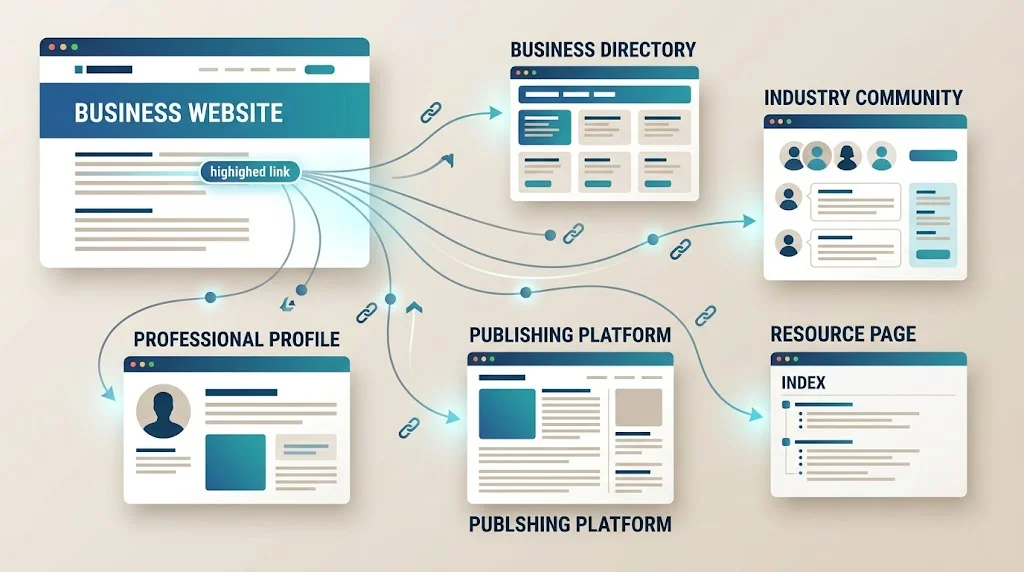
If you are asking where can i post links for free, the answer is broader than a list of websites that accept URLs.
You can share a website through business profiles, relevant communities, professional networks, directories, publishing platforms, Q&A discussions, resource pages, and other legitimate channels. But each type of opportunity serves a different purpose.
Some are mainly useful for brand discovery. Others can generate referral traffic, support local visibility, distribute content, or help people find a useful resource. A few may also contribute to search visibility, but you should never assume that every free link passes SEO value.
The real skill is knowing where a link belongs, why it belongs there, and how to add it without turning useful promotion into spam.
This guide explains the major types of free link opportunities, how to evaluate them, how to choose the right destination page, and when a free opportunity is worth pursuing.
What Does Posting a Link for Free Actually Mean?
A free link is simply a URL you can place or share without paying the website owner for that specific placement.
That can happen in several ways:
- A business profile
- A professional profile
- A social post
- A relevant community contribution
- A Q&A answer
- A forum discussion
- A business directory
- An industry directory
- A publishing platform
- A resource page
- A project or product profile
- A local organization listing
- An editorial mention you earn rather than purchase
These opportunities should not be treated as interchangeable.
A link in a local business profile has a different purpose from a link inside an expert article. A community answer has a different role from a directory listing.
So instead of asking only:
“Does this website let me post a link?”
ask:
“Does this website give my audience a legitimate reason to need this link?”
That is the more useful starting point.
Why Would You Post a Link for Free?
Free link opportunities can support several legitimate goals.
Referral Traffic
A relevant community, publication, or professional network can send visitors directly to your website.
This is often the easiest benefit to understand because the result is measurable: people click the link and arrive on your site.
Brand Discovery
Someone may discover your company while researching a topic, answering a question, or browsing a professional profile.
The visitor may not click immediately, but the exposure can still introduce your brand to a relevant audience.
Content Distribution
If you publish a useful guide, study, tool, or checklist, external platforms can help put it in front of people who may benefit from it.
Local Visibility
A legitimate business profile or relevant local directory can make it easier for customers to discover a business and its website.
Community Participation
A link can provide supporting information when it genuinely helps answer a question or solve a problem.
Relationship Building
Useful contributions can help establish relationships with publishers, communities, industry organizations, and potential partners.
The important distinction is that the link should support the objective rather than become the objective itself.
Where Can I Post Links for Free?
There is no universal list that works for every website.
The best opportunity depends on your business, audience, content, and reason for sharing the URL.
1. Business Profiles
Legitimate businesses can often maintain profiles on relevant business platforms.
These profiles may include:
- Website
- Business description
- Contact information
- Business category
- Location or service area
- Hours
- Other relevant business information
For eligible businesses, Google Business Profile is one example of a business presence that can help customers find a company through Google Search and Maps.
The important word is legitimate.
Do not create fake locations or duplicate businesses simply to obtain additional URLs.
2. Social and Professional Profiles
Many social and professional platforms provide places for users, creators, organizations, or businesses to identify their website.
These links are generally most useful for:
- Brand discovery
- Referral traffic
- Professional identity
- Audience development
A complete profile can be useful even when the link itself has little direct SEO value.
Creating dozens of empty accounts simply for links is a very different activity.
3. LinkedIn
LinkedIn can be useful for distributing professional content and participating in industry discussions. LinkedIn supports sharing URLs through posts and publishing longer-form content.
The strongest use is not:
“Here is my link.”
Instead, give the reader useful information first.
For example:
Three technical problems repeatedly slow down small-business websites. Here is what they are, why they happen, and how to identify them.
Then your detailed resource can provide additional information.
That gives the link a reason to exist.
4. Relevant Forums
Forums can still be useful when the subject matches your expertise.
A legitimate contribution might:
- Answer the question.
- Explain the important details.
- Provide an example.
- Link to a deeper resource only when necessary.
A poor contribution does the opposite:
- Find a thread.
- Paste a URL.
- Add almost no explanation.
- Repeat the process across many threads.
The second approach looks like promotion because it is promotion without meaningful participation.
5. Reddit Communities
Reddit is not one website with one universal posting policy. Individual communities can have different rules about links and self-promotion.
A useful approach is:
Read → participate → understand the community → contribute → share only when appropriate.
A good test is:
Would my contribution still be useful if the link were removed?
If the answer is no, rethink the contribution.
Current discussions and guides around community link sharing consistently emphasize relevance and context rather than simply dropping URLs.
6. Q&A Platforms
Q&A platforms can be valuable when your content genuinely helps answer a question.
The answer should contain useful information on the platform itself.
For example, instead of:
“You can solve this problem with these steps. Read my article here.”
write the actual steps.
Then, if your detailed guide adds something useful, reference it where platform rules permit.
Quora’s current policies, for example, require answers to address the question and restrict self-promotional links that are not part of a direct and helpful answer.
7. Business Directories
Directories can be useful when they serve a real purpose.
Consider:
- Local business directories
- Industry directories
- Professional directories
- Trade organizations
- Regional directories
- Niche-specific directories
A directory is more useful when its audience actually searches for the type of business or organization being listed.
Do not choose a directory merely because it offers a free submission.
8. Industry Organizations and Associations
If you genuinely belong to an industry organization, professional association, chamber, or other legitimate group, check whether it provides member profiles or directories.
This type of link has a meaningful relationship behind it:
Business → Organization → Membership/profile → Website
That is fundamentally different from:
Business → Random directory → URL
The first is supported by a real-world connection.
9. Publishing Platforms
Publishing platforms can help distribute useful content.
But avoid using them as duplicate-content warehouses.
Instead of copying your entire article, consider creating a different contribution:
Original website:
Complete guide to local SEO.
External publication:
Five local SEO mistakes small businesses commonly overlook.
The external article can provide independent value while pointing readers toward a deeper resource where appropriate.
10. Resource Pages
Resource pages are slightly different because you may not be able to place the link yourself.
Instead, you may need to:
- Find a relevant resource page.
- Check whether your content genuinely fits.
- Make sure your resource is useful enough to recommend.
- Contact the publisher if appropriate.
- Explain why it belongs there.
This is better described as earning a link than simply posting one.
11. Community Resource Threads
Some communities intentionally provide:
- Promotion threads
- Startup showcases
- Project threads
- Portfolio discussions
- Resource-sharing posts
- Weekly self-promotion opportunities
These can be useful because promotional content is part of the intended context.
But always follow the individual community’s rules.
A promotion thread is permission to participate—not permission to post unlimited URLs.
12. Product, Tool, and Project Communities
If you created something useful, look for communities that discuss that type of resource.
Examples include:
- SaaS products
- Software tools
- Templates
- Open-source projects
- Apps
- Research projects
- Developer resources
- Business tools
The more specific the audience, the easier it becomes to explain why the resource belongs there.
Free Link Posting vs. Link Earning
This distinction is important.
Free link posting
You have a legitimate place where you can add the URL.
Examples:
- Business profile
- Social profile
- Community contribution
- Directory
- Publishing account
Link earning
Another website decides to reference your content.
Examples:
- Editorial citation
- Resource page
- Research reference
- Industry article
- Expert contribution
The second usually requires stronger content because you have to give another publisher a reason to reference you.
That is why a free-link strategy should not consist entirely of submission websites.
What Makes a Free Link Opportunity Worth Using?
Evaluate an opportunity using six questions.
1. Relevance
Is the website or community related to your subject?
2. Audience
Are the people there likely to care about your content?
3. Context
Can you explain naturally why your link belongs?
4. Quality
Does the platform appear legitimate and useful?
5. Rules
Does the platform actually allow this type of contribution?
6. Outcome
Could the link realistically produce visibility, referral traffic, discovery, or another useful result?
If the only positive answer is:
“It gives me a backlink,”
the opportunity probably deserves another look.
A Simple Opportunity Classification
| Opportunity | Primary purpose | What to evaluate |
|---|---|---|
| Business profile | Local/business discovery | Eligibility and accuracy |
| Industry directory | Niche discovery | Relevance and audience |
| Social profile | Brand discovery | Profile quality and audience |
| Professional network | Content distribution | Professional relevance |
| Community contribution | Help + referral | Rules and context |
| Q&A answer | Problem solving | Answer quality |
| Publishing platform | Content distribution | Audience and originality |
| Resource page | Editorial discovery | Topical fit |
| Organization profile | Credibility/discovery | Genuine relationship |
| Random link directory | URL submission | Usually weak unless useful |
This table is a decision aid, not a promise of SEO value.
Do Free Links Help SEO?
Sometimes the broader activity can support search visibility, but not every free link should be treated as an SEO backlink.
A link may provide:
- Referral traffic
- Brand exposure
- Content discovery
- Business discovery
- Audience development
- Editorial context
- Search-engine discovery
Its direct ranking value can vary based on the platform, link implementation, context, and other factors.
Google’s guidance also distinguishes natural, useful links from links created primarily to manipulate search rankings.
So do not build a strategy around the assumption that:
100 free links = 100 SEO votes.
That is an overly simplistic way to evaluate links.
How to Post a Link Without Looking Like Spam
Use the value-first test.
Before adding a URL, ask:
What useful information am I giving the reader before they click?
Then:
Answer first
Give the important information directly.
Explain the context
Tell the reader why the resource is relevant.
Link only where useful
The link should expand the answer.
Use the right destination
Send visitors to the page that actually answers their need.
Follow platform rules
A technically available link field does not mean every promotional use is acceptable.
Choose the Right Page to Promote
Do not send every opportunity to your homepage.
Match the destination to the reader.
| Reader’s need | Better destination |
|---|---|
| General company information | Homepage |
| Specific question | Detailed guide |
| Tool recommendation | Tool page |
| Local service | Relevant service page |
| Research question | Study/report |
| Technical problem | Technical guide |
| Downloadable resource | Relevant resource page |
This makes the link more useful and usually produces a better visitor experience.
Should You Use Exact-Match Anchor Text?
There is usually no reason to force an exact commercial keyword into every external contribution.
Natural phrases can be more appropriate:
- full guide
- detailed checklist
- research report
- complete tutorial
- pricing information
- technical walkthrough
The wording should fit the surrounding sentence.
Google recommends descriptive link text that helps users understand the destination.
Common Free-Link Mistakes
Posting the Same URL Everywhere
A URL does not become more valuable simply because you repeat it across unrelated websites.
Ignoring Community Rules
This can lead to deleted posts, rejected contributions, or account restrictions.
Using Irrelevant Directories
A free submission is not automatically a useful submission.
Creating Fake Profiles
Fake accounts and fake businesses create reputation and policy problems.
Writing Almost Nothing Except the Link
This makes the URL look like the purpose of the post.
Using the Homepage for Everything
Different users need different destinations.
Chasing Metrics
Third-party authority metrics can help with research, but they do not replace relevance, audience, or context.
A Better Free Link Workflow
Step 1: Choose the asset
Pick the page, guide, tool, study, or resource you actually want to promote.
Step 2: Define its audience
Who benefits from it?
Step 3: Find relevant environments
Search for communities, organizations, directories, publications, and networks where those people participate.
Step 4: Check the rules
Do this before preparing your contribution.
Step 5: Study existing content
Look at what the audience actually considers useful.
Step 6: Create the contribution
Answer, explain, demonstrate, or provide useful information.
Step 7: Add the link
Use it as supporting information.
Step 8: Track outcomes
Monitor referral traffic and other meaningful signals when possible.
Step 9: Keep the channels that matter
If a community produces useful visitors or relationships, continue investing in it.
When Should You Stop Pursuing a Free Link?
Move on when:
- The audience is unrelated.
- The site exists mainly for link submissions.
- The platform has excessive spam.
- The rules make your intended contribution inappropriate.
- There is no realistic audience.
- Your only reason for using it is a third-party metric.
- You cannot explain why a reader would need your link.
Time is also a resource.
A “free” link that takes three hours to obtain and produces nothing may be more expensive than a legitimate opportunity that requires a different investment.
Free Opportunities vs. Paid Guest Posts
Free link opportunities can be useful when you can contribute directly.
Paid guest posting is a different acquisition model because money is involved and the publisher relationship needs additional due diligence.
You may need to evaluate:
- Publisher relevance
- Audience
- Editorial standards
- Content requirements
- Placement terms
- Link attributes
- Disclosure
- Retention
- Cost
Google’s documentation recommends qualifying paid links appropriately, with rel="sponsored" specifically recommended for paid placements.
If you are researching that side of link acquisition, our detailed guide covers paid guest-post opportunities.
If you want to go deeper into selecting the right places to share links, see our practical guide to link-posting options.
Free Link Opportunity Checklist
Before posting, ask:
- Is the platform relevant?
- Is the audience relevant?
- Does the platform permit this type of link?
- Have I read its current rules?
- Does the link genuinely help?
- Am I providing useful information?
- Is the destination page relevant?
- Is the surrounding context natural?
- Am I avoiding repetitive promotion?
- Could this produce real visitors or discovery?
- Would the contribution still be useful without the link?
If most answers are yes, you have a much stronger opportunity than a random “free backlink site.”
Frequently Asked Questions
Can I post website links for free?
Yes. Depending on your website and audience, you may have opportunities through business profiles, professional networks, communities, directories, publishing platforms, Q&A sites, resource pages, and other legitimate channels.
Where can I post a website link without paying?
The right place depends on your purpose. Local businesses may benefit from relevant business profiles and directories, while publishers and marketers may find opportunities through communities, professional networks, Q&A platforms, and publishing environments.
Do free links help SEO?
They can provide useful visibility, referral traffic, discovery, and other benefits, but not every free link provides traditional SEO value. Relevance and context are more important than simply accumulating URLs.
Are free directory links worth using?
A legitimate, relevant directory can be useful for discovery or local visibility. A directory created mainly to collect unrelated links is much harder to justify.
How can I post links without getting marked as spam?
Provide useful information first, follow the platform’s rules, use the most relevant destination page, and include the link only when it genuinely helps the reader.
Final Takeaway
The best answer to where can i post links for free is not a giant list of websites.
It is a method for deciding where your link belongs.
Start with the audience. Choose the right destination. Find a relevant environment. Understand its rules. Contribute something useful. Then use your link to provide additional value.
That approach can support traffic, discovery, branding, relationships, and legitimate content distribution without turning your promotion strategy into a race for the highest number of backlinks.
Value first. Relevance second. Link third.